









Enterprise Data Extraction Software

    Automate Document Data Extraction in a No-Code Tool

    Astera ReportMiner automates AI data extraction from invoices, reports, statements, contracts, forms, scans, handwritten docs, and other files.

    • Automatically processes PDFs, Txt files, Word, Excel, legacy reports, and 15+ formats with AI and OCR
    • One platform to extract, clean, transform, and validate high-volumes of document data
    • Writes clean, validated data to Excel, ERP, databases and 300+ destinations
    High-Volume ProcessingEnterprise SecurityAward-Winning Support

    Leading Enterprises Choose ReportMiner for Data Extraction

    CarringtonParallonWescom Credit UnionU.S. Department of Veterans AffairsBeal Service CorporationMaverikDCAACienaTMPGap SolutionsEMCOAdvancialAccelerate360ConduentCoworxCoronetKeith Titus CorporationSycomp
    Real Results from Real Customers

    Trusted by 500+ Enterprise Users for Data Extraction

    Want to see similar results with your documents?

    How Data Extraction Automation Works

    Automate High-Volume Data Processing Workflows. No Manual Handoffs.

    Step 1 of 6

    Ingest Documents From Any Channel

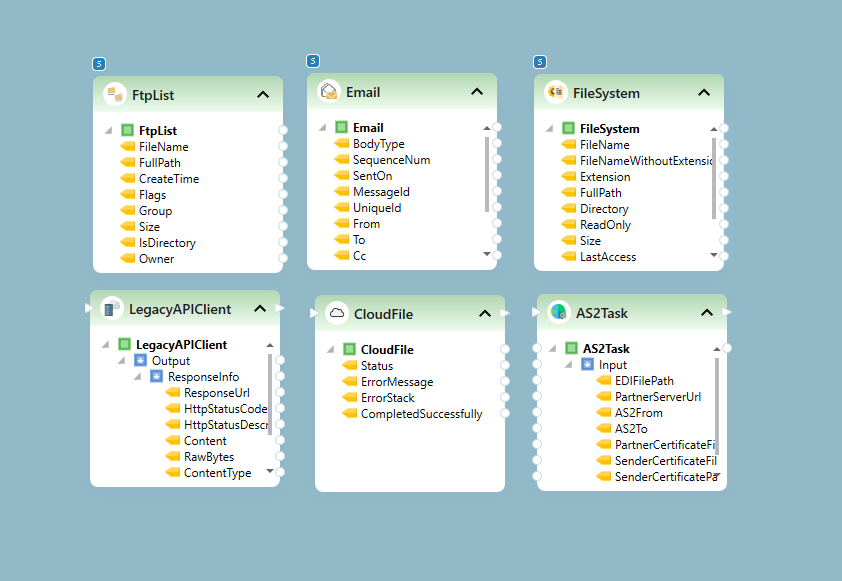
    Pull documents from email, file drops, FTP/SFTP, cloud drives, web services, or API calls. ReportMiner accepts PDFs, text files, CSVs, Excel, Word, RPT, Images, TIFF, and EDI. Password-protected files are handled automatically. No preprocessing required.

    Ingest workflow in ReportMiner
    Why Astera ReportMiner

    AI Data Extractor Built for High-Volume Processing, Reliable at Scale

    Extract Data from Any Document, Scanned or Digital

    ReportMiner pulls accurate data from invoices, purchase orders, freight documents, mainframe reports, financial statements, contracts, and more. Its LLM-based AI OCR handles handwriting and skewed, faded, or low-quality scans without manual cleanup.
    Document Processing on Autopilot

    Automate data workflows to extract, clean, validate, transform, and track thousands of documents in one platform. Easily process 10,000+ pages in a day without any downtime. Best for enterprise document workloads.

    Easy-to-Use Interface Powered by AI

    Build and automate your entire data extraction workflow in a no-code visual interface and preview results instantly. Use templates for consistent layouts, AI for documents that vary, and natural language copilots to adjust extraction logic.

    Get Clean, Validated Output

    Validate critical fields against business rules, standardize dates and currencies, and transform extracted data with ReportMiner. Fix formats, flag anomalies, and write clean data to Oracle, SQL, Excel, and 300+ destinations.

    Keep Sensitive Data Inside Your Environment

    Deploy on-premises, private cloud, or hybrid to meet security and data residency requirements. Ideal for regulated industries, government agencies, and enterprises.

    Real-Time Visibility and Control

    Track every data extraction flow in real time, identify bottlenecks instantly, and get alerts on what needs attention. Maintain a complete, searchable audit trail of every action performed on the document.

    Free Your Team from Manual Data Extraction

    Extract all your documents into accurate, ready-to-use data that flows directly into your systems.

    Built for Intelligent Data Extraction

    Experience Accurate and Easy Document Extraction in a Visual Interface

    01

    Invoices

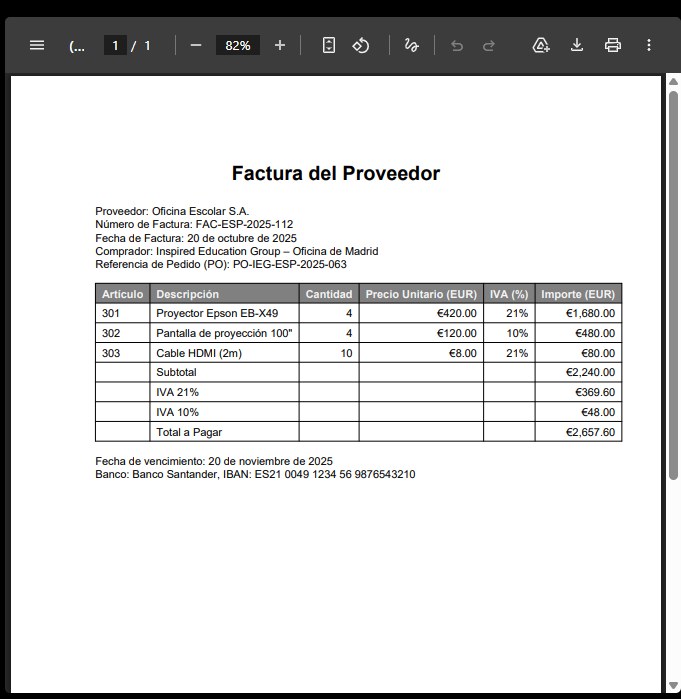
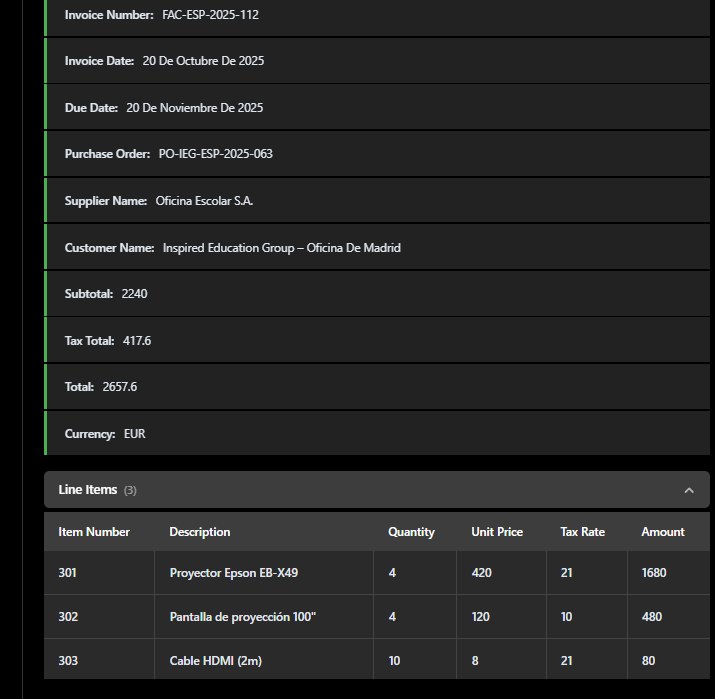
    AP invoice, multi-language · AI-powered data extraction

    Original document
    Invoices source document
    Extracted data
    Invoices extracted data
    Award-Winning Support & Software

    Award-Winning Data Extraction Software

    Astera ReportMiner is recognized by hundreds of users for its fast and easy-to-use data extraction platform. We are top-rated for customer support.

    G2 Best Support
    TrustRadius Most Loved 2024
    Top Performer
    SoftwareSuggest Easy Usability 2025
    Integrations

    Data Extraction Software That Connects to Everything

    Astera ReportMiner fits into your existing infrastructure, ingesting unstructured data from any source and delivering clean, structured data to any destination.

    Storage & Transfer

    Email
    FTP/SFTP
    MFT
    AWS S3
    Azure Blob
    SharePoint

    Web Services

    REST APIs
    SOAP
    Webhooks
    MCPs

    Databases & Apps

    SQL Server
    Oracle
    PostgreSQL
    MySQL
    Snowflake
    Redshift
    Salesforce
    Dynamics CRM

    Formats

    Excel
    CSV
    JSON
    XML
    TXT
    Parquet
    Enterprise Security

    Zero Data Egress.

    Deploy ReportMiner on-premises, in private cloud, or hybrid. It runs where your data lives, so no sensitive data leaves your network environment.

    Frequently Asked Questions

    Automated Data Extraction FAQs

    What is automated data extraction, and how does Astera ReportMiner handle it?

    Automated data extraction pulls fields, tables, and line items out of invoices, purchase orders, financial reports, and other documents and turns them into structured, usable data without manual entry. As intelligent data extraction software, Astera ReportMiner combines OCR for scanned pages, pattern matching for consistent layouts, and data extraction AI for documents with no fixed structure, then runs every value through validation rules before exporting it to Excel, databases, or your ERP through 300+ connectors.

    Does ReportMiner use document extraction AI or fixed templates?

    Both, within a single pipeline. Templates deliver deterministic results on consistent layouts, including dense tables with 50+ columns, merged cells, and multi-row headers, because they match patterns rather than guess at structure. Document extraction AI handles layouts that change from vendor to vendor or page to page without a new template, so one workflow can route structured invoices to a template and irregular ones to AI extraction automatically.

    Can it extract data from scanned, handwritten, or low-quality documents?

    Yes. ReportMiner applies adaptive preprocessing, including skew correction, noise removal, and contrast adjustment, before OCR runs, so rotated, faded, watermarked, and handwritten documents come out readable. Post-OCR semantic correction then checks each value against the document's own patterns to catch character misreads that OCR alone would miss.

    How quickly can my team start extracting data?

    Most teams extract data from their first batch of documents within minutes of building a template or pointing the AI extractor at a sample, then run the same pipeline unattended. Once automated, ReportMiner processes thousands of pages per hour with no per-page fees, and Ciena Corporation cut purchase order processing from 30 minutes to under 2 minutes per document.

    Do I need coding skills to set up automated data extraction?

    No. ReportMiner's visual interface lets you define fields, tables, and validation rules through point-and-click configuration, and natural language copilots adjust extraction logic when a layout changes, so business users can maintain their own templates without a request to IT for every update.

    Extract Every Document into Accurate Data That Moves Your Business Forward

    Set up once, connect to your systems, and let Astera ReportMiner continuously extract and deliver structured data.

    ✓ No document type limits✓ No per-page costs✓ Dedicated onboarding